A walk-up trivia game with physical buzzers that helps university students meet each other. Designed,
built and tested by a six-person team, with me on UI and front-end design.
Campus Connect is a self-running trivia station for high-traffic spots on campus.
Students walk up, grab a buzzer, pick a mode and play on a shared screen, either competing for a place
on the all-time leaderboard or teaming up for a shared score. No facilitator, app download or booking is
needed. It was our team project for DECO3801 Design Computing Studio 3 – Build at The
University of Queensland (2024), taken from interviews and Figma mockups to a working Raspberry Pi
build tested over two rounds.
Role:
One of three designers on the front-end team: user research, Figma UI design and iteration, design
rationale, user testing and team documentation. I worked alongside three back-end developers who
built the game engine and database.
Tools:
Figma & Adobe Illustrator
Python & Pygame on Raspberry Pi
Buzz! controllers via HIDAPI
HTML & JavaScript sign-up site
PostgreSQL on UQ Zones
GitHub, Discord, Miro
Problem
On a big campus it's easy to feel anonymous. Students walk past hundreds of people a day but rarely have
a natural reason to start talking. Existing options don't fill the gap: on-campus trivia nights run on a
fixed schedule at one venue and suit a particular crowd, while apps like Kahoot need a host and keep
everyone staring at their own phone.
Research shows that structured, task-based activities reduce social anxiety because
people focus on a shared goal rather than on the conversation itself. We set out to design a
low-pressure, always-available activity that gives strangers that shared goal.
Solution
A shared screen and up to four physical buzzers turn a corridor or food court into a game show anyone
can join in seconds.
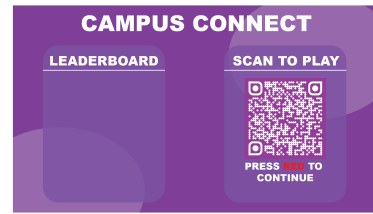
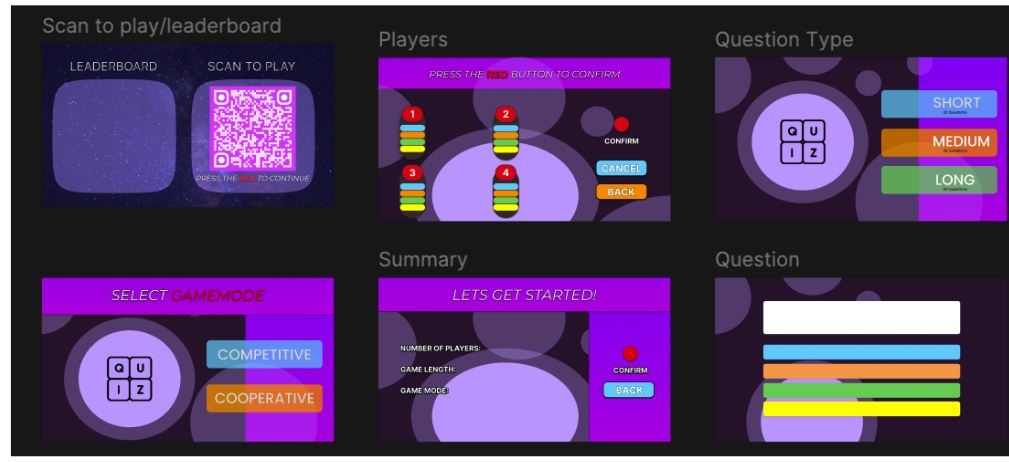
Scan, pick a colour, play
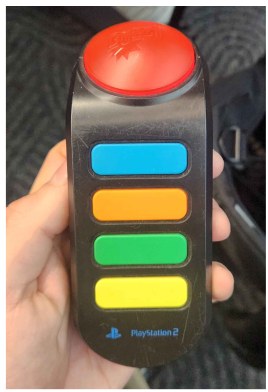
Physical buzzers: colour-coded buttons map directly to on-screen answers. Testers called it "an arcade experience, more fun than using my phone."
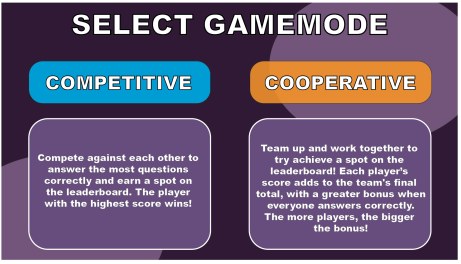
Two modes:Competitive for leaderboard glory, or Cooperative, where everyone's points add to a team total with a bigger bonus when the whole group answers correctly.
Game length: short, medium or long, so a quick game fits between classes.
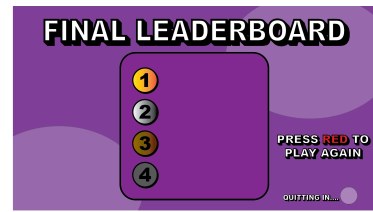
Leaderboard and sign-up: a QR code links to a sign-up page that verifies UQ students. Players choose a nickname, so their real name never appears on screen.
Sound design: upbeat music, chimes and buzzers for instant feedback, plus a special cue when the whole team gets the bonus.
UX Research & Design
We started by surveying students who attend on-campus trivia nights about what makes them fun and what
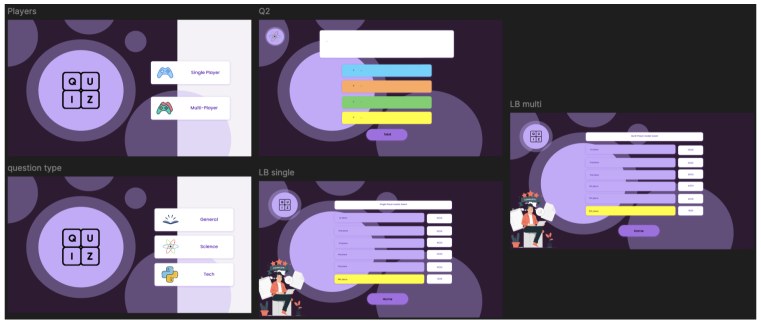
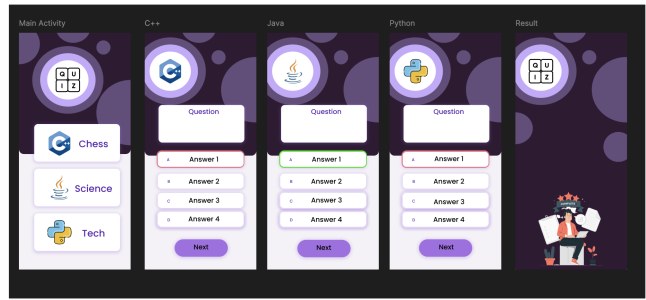
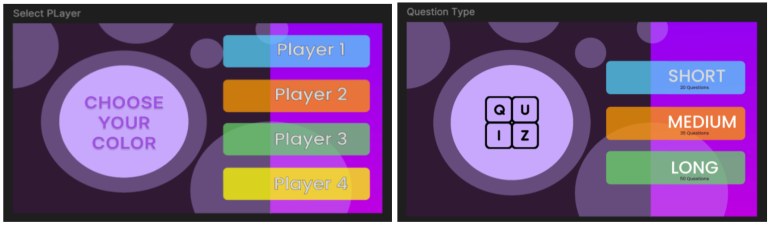
stops people joining. Then we designed in Figma before any code was written, so the developers built
against an agreed, tested interface. The first full Figma prototype was ready by week 5.
Design decisions
UQ purple: the palette borrows from the university's brand, so the station feels like it belongs on campus.
Low cognitive load: one question at a time in a familiar, sequential layout, so players focus on answering rather than navigating.
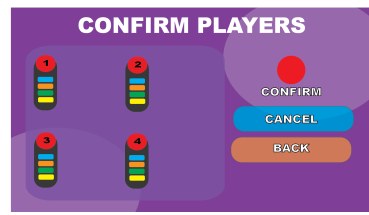
Controller-only navigation: every screen is built around the buzzer's four colours, with no touchscreen or keyboard.
Clear onboarding: players claim a colour, then pick a mode and length, each explained in a line or two.
Two rounds of user testing
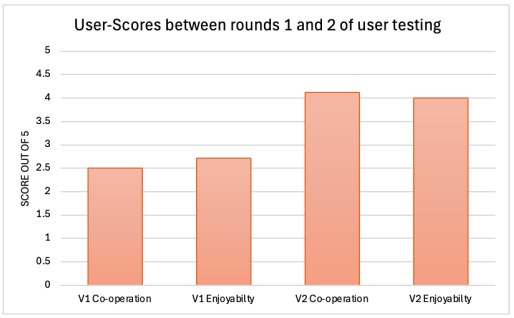
Each team member tested the build with 3–5 students per round, using surveys and observation to score
co-operation and enjoyment out of 5. Round one (V1) showed that people liked the arcade feel but wanted
to play with each other, not just against each other. They also asked for answer confirmation,
time to discuss between questions, and a live view of the scores.
After adding Cooperative mode in V2, co-operation scores rose from about 2.5 to about 4.1 out of 5,
and enjoyment from about 2.7 to about 4.0.
Cooperative mode: the most requested feature, added in V2 with a team bonus that grows with group size.
Instant feedback: correct-answer reveals and sound cues so players can react and talk about each question.
Nicknames: added after testers worried about their names and data being shown publicly.
Game length options: added because players said time between classes decides whether they'd stop to play.
Development
The team split by strength: three designers on research and front-end, three developers on the game
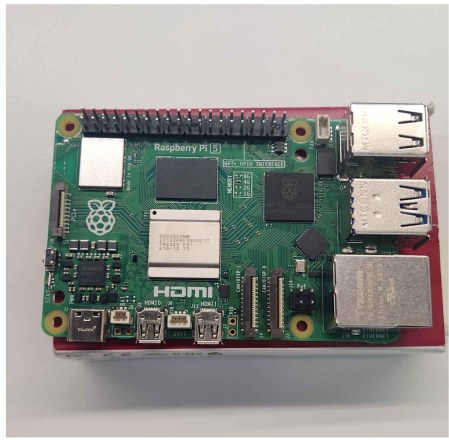
engine and database. The game runs in Python and Pygame on a Raspberry Pi, reads
PlayStation Buzz! controllers through HIDAPI, and pulls randomised questions from a
trivia API. A small HTML/JavaScript site, reached through the in-game QR code, handles sign-up and
student verification, and stores players and scores in PostgreSQL on UQ's secure Zones.
Hardware
Off-the-shelf buzzers and a Raspberry Pi kept the station cheap, portable and easy to set up anywhere
on campus. The colour layout of the buzzers drove the entire UI system.
Designing responsibly
Privacy: explicit consent at sign-up, nicknames on screen, and data held on UQ's encrypted infrastructure.
Fair play: randomised questions and per-question timers make it hard to look answers up.
Inclusive incentives: we dropped an early idea to partner with the campus bar because alcohol rewards would exclude many students. We chose leaderboards and non-alcohol rewards instead.
Known gap: the current version doesn't support visually or physically impaired players. Audio questions and alternative inputs are first on the list.
Key Learnings
The clearest lesson came from the data: for a social product, cooperation beats
competition. One change, letting players win together, moved both co-operation and enjoyment
scores by well over a point. Testing early enough to make that change was what turned a quiz game
into a tool for meeting people.
It also showed me how much design-first collaboration speeds up a six-person team.
Agreeing the Figma flow before development gave the developers a clear target, and splitting by skill
let research, design and engineering run in parallel without stepping on each other.